Exporting Characters and Updated Roadmap
In the recently deployed version 1.0.18 of Trolddom, I’ve introduced the option of exporting and importing characters. This allows you to grab your character from the official server and import it into your offline mode or a custom server. That should all be quite straightforward, but it gets a bit more complicated when you start moving characters between different custom servers. In this blog post I’ll try to dig into some of those complications and also talk a bit about the future of the game.
Exports and imports⌗
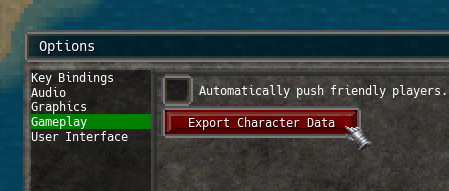 It’s very simple to export your current character, just navigate into gameplay options and click on the button. This will create a text file that contains your character’s data. Note that the file is cryptographically
signed and can’t be tampered.
It’s very simple to export your current character, just navigate into gameplay options and click on the button. This will create a text file that contains your character’s data. Note that the file is cryptographically
signed and can’t be tampered.
In order to import it either enter offline mode or connect to a custom server, create a new character, and click the import button. Locate the file you exported and that should be it. If the original character name is in use you’ll be prompted to pick a new one.
Custom server configuration⌗
Imagine the following scenario:
- Multiple people have custom servers, let’s call them Adam, Bob, Charlie, and Deborah.
- Adam wants to allow players from these particular servers to move their characters to his server.
- Adam does not want to allow imports from any other custom servers.
- Adam definitely doesn’t want people importing their offline mode characters into his server.
In order to do this, Bob, Charlie and Deborah, need to set up cryptographic signing:
- Install the
opensslcommand line utility. - Create private and public keys:
openssl genpkey -algorithm EC -pkeyopt ec_paramgen_curve:prime256v1 -out my-private-key.pem
openssl pkey -in my-private-key.pem -pubout -out my-public-key.pem
- Add this line to their custom server configuration:
signature_private_key <path to my-private-key.pem>
- Send their public keys to Adam.
Adam then needs to update his custom server configuration to trust imports signed with these other keys:
trust_signature_public_key <path to bob-public-key.pem>
trust_signature_public_key <path to charlie-public-key.pem>
trust_signature_public_key <path to deborah-public-key.pem>
Alternatively he can put all the public keys in a directory and add this configuration line instead:
trust_signature_public_key_directory <path to directory>
Per default, people will only be allowed to import the same character once, no matter how many times they export it. If unlimited imports are desired, the gateway configuration needs to be updated:
begin module gateway
	allow_multi_imports true
end
Imports can also be disabled completely with:
begin module gateway
	allow_imports false
end
Updated roadmap⌗
Working on Trolddom is no longer my full time occupation as I’ve now picked up a real job, which allows me to pay rent. This is unfortunately going to affect how much time I get to work on the game. I’m definitely not going to abandon it, but it will now continue as a hobby project going forward.
The main next major goal is to release a big update that raises the level cap to 40. Lots of new quests, zones, and other content. Coinciding with this update, I imagine that I’ll change the game to use a “free-to-play” model:
- Demo will be scrapped.
- Free-to-play version of the game limited to the first 30 levels.
- Increased level cap will be a paid DLC for new users. People who’ve already bought the game don’t need to do this to access new content.
Essentially it will work like it does now, but with a larger demo in the shape of a free-to-play version of the game.
Why? To get more people to play the game. Seems like the average MMORPG player is more inclined to try out games that don’t have price stickers.
Anyway, with my new day job, the process will be quite slow. Difficult for me to put up a time line for this. The “possession” feature that I rambled about in my previous blog post will likely be part of the major update. Same goes for Karraticus’s new druid class.